Your Big Client Wants E-Invoices — Ready in 10 Minutes
Posted on September 25, 2026
← Back to Pillar: E-Invoicing in Germany for Freelancers and Small Businesses Related articles: ZUGFeRD or XRechnung? · The 6 most common mistakes
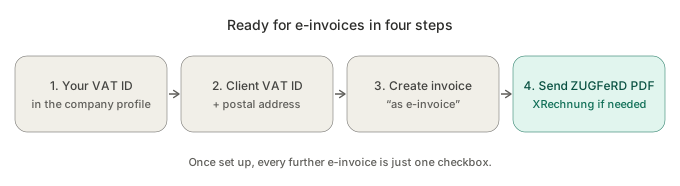
When a large client asks for e-invoices, you don't need accounting software or a new system. Four steps are enough: add your VAT ID to your company profile, add the client's VAT ID and postal address, generate the invoice as an e-invoice and send the ZUGFeRD PDF — plus the XRechnung file if needed. Once that's set up, every further e-invoice is just one checkbox.
Why the client asks earlier than the law requires
Companies with more than €800,000 turnover must send e-invoices themselves from 2027, and they're switching their whole accounts department to do it. Once they're at it, they want to process incoming invoices automatically too — and ask all suppliers for e-invoices, including those whose own deadline is 2028.
Step 1: Complete your own details
An e-invoice must state exactly who is issuing it. Add your full name, address and VAT ID to your company profile.
Step 2: Complete the client's details
Add the client's VAT ID and a complete postal address. Because you keep client data in one place only, this applies to every future invoice to that client — not just the next one. More: Entering Customer Data Only Once
Step 3: Generate the invoice as an e-invoice
Create the invoice as usual from your template or straight from the accepted offer. In SmoovOps (Starter plan and up), tick "Generate as e-invoice (ZUGFeRD)" before saving. If a detail is missing, SmoovOps tells you exactly which one — and your invoice isn't lost.
Step 4: Send
Email your client the ZUGFeRD PDF — email is a valid way to deliver e-invoices. If they explicitly ask for XRechnung, attach the XRechnung file that's generated alongside it.
Real-world example
A management consultant received a supplier notice from his biggest client in October: "From 1 Jan 2027 we only accept e-invoices." His VAT ID had long been in his profile; the client was only missing a postal address. Ten minutes later the first e-invoice was sent, and the client's accounts department confirmed automatic processing the next day.
What you can do now
Check whether the VAT ID and postal address are complete for your three most important business clients. That's the part most often missing — and the only one that takes time.
FAQ
Do I have to change my invoice template? No. The e-invoice is created from the same data as your normal invoice; the layout stays the same.
Can I send the e-invoice by email? Yes. Email is a valid way to deliver e-invoices.
What if the ZUGFeRD file isn't enough for my client? Then send the XRechnung file SmoovOps generates alongside every e-invoice. Public authorities often have further requirements such as a Leitweg-ID — clarify those beforehand.
Note: This article is not tax advice. The binding sources are the German Federal Ministry of Finance and your IHK (chamber of commerce) (both in German); for your specific case, ask your tax advisor.
All of it in 13 pages: Get our free booklet E-Invoicing, Compact as a PDF – with the decision tree, a mistakes check and a switch-over plan – and receive the SmoovOps newsletter. → Get the booklet
Archives
- October 2026 (3)
- September 2026 (4)
- August 2026 (4)
- July 2026 (5)
- June 2026 (4)
- May 2026 (5)
- April 2026 (4)